" height="28.235345940422295px" id="q9sQ2kzlE" transform="translate(0 0.38)" width="29.999999345730185px"/></svg>)
NameRead
NameRead
Helping people say names with confidence in first-time interactions.
Helping people say names with confidence in first-time interactions.
Mispronunciation isn’t a knowledge problem. It’s a social pressure problem. NameRead will help people say names right in Zoom meetings in first-time interactions.
Mispronunciation isn’t a knowledge problem. It’s a social pressure problem. NameRead will help people say names right in Zoom meetings in first-time interactions.
• 87.5% of users felt “more respectful and comfortable.”
• 87.5% of users felt “more respectful and comfortable.”
• Reduced hesitation in meetings
• Reduced hesitation in meetings
• Improved inclusivity in remote teams
• Improved inclusivity in remote teams
Role
Role
Product Designer
Product Designer
Timeline
Timeline
5 Weeks, 2025
5 Weeks, 2025
Team
Team
Independent Project
Independent Project
Contribution
Contribution
Prototyping, Usability testing, Storytelling, User research
Prototyping, Usability testing, Storytelling, User research
“Mispronouncing names isn’t just about language. It’s about identity, respect, and belonging.”
- Participant, Professor at Columbia University
“Mispronouncing names isn’t just about language. It’s about identity, respect, and belonging.”
- Participant, Professor at Columbia University
“Mispronouncing names isn’t just about language. It’s about identity, respect, and belonging.”
- Participant, Professor at Columbia University
Problem?
Problem?
People avoid saying unfamiliar names in first meetings because they fear getting them wrong in public — a social risk.
People avoid saying unfamiliar names in first meetings because they fear getting them wrong in public — a social risk.
People avoid saying unfamiliar names in first meetings because they fear getting them wrong in public — a social risk.
In remote meetings, reading a name can always be the first moment of hesitation. Mispronouncing a name can quietly build disconnection before a conversation even begins.
In remote meetings, reading a name can always be the first moment of hesitation. Mispronouncing a name can quietly build disconnection before a conversation even begins.

"I need a tool to help me know how to read my new clients' names. That will make me less stressed when reading their names."
"I need a tool to help me know how to read my new clients' names. That will make me less stressed when reading their names."
"I need a tool to help me know how to read my new clients' names. That will make me less stressed when reading their names."
Research?
Research?
From 15+ user interviews, we found:
From 15+ user interviews, we found:
From 15+ user interviews, we found:
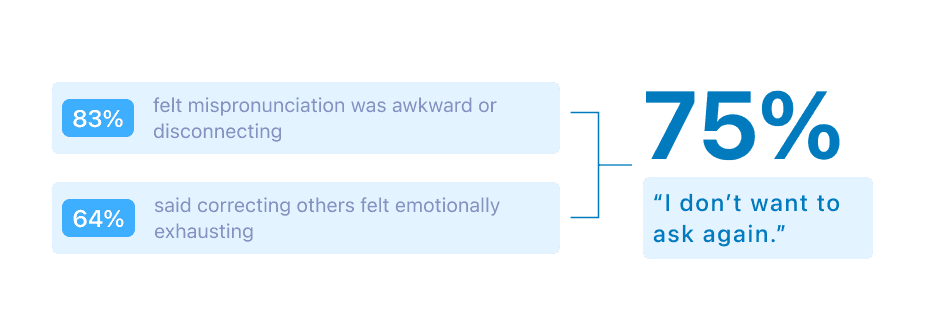
• People don’t want to ask for pronunciation again so quickly, so they hesitate to say names until they feel more familiar.
• People don’t want to ask for pronunciation again so quickly, so they hesitate to say names until they feel more familiar.
• The first meeting is the highest-friction moment because people have not built familiarity yet.
• The first meeting is the highest-friction moment because people have not built familiarity yet.
Core Issue?
Core Issue?
Current meeting tools don’t help users pronounce unfamiliar names confidently before speaking.
Current meeting tools don’t help users pronounce unfamiliar names confidently before speaking.
Current meeting tools don’t help users pronounce unfamiliar names confidently before speaking.
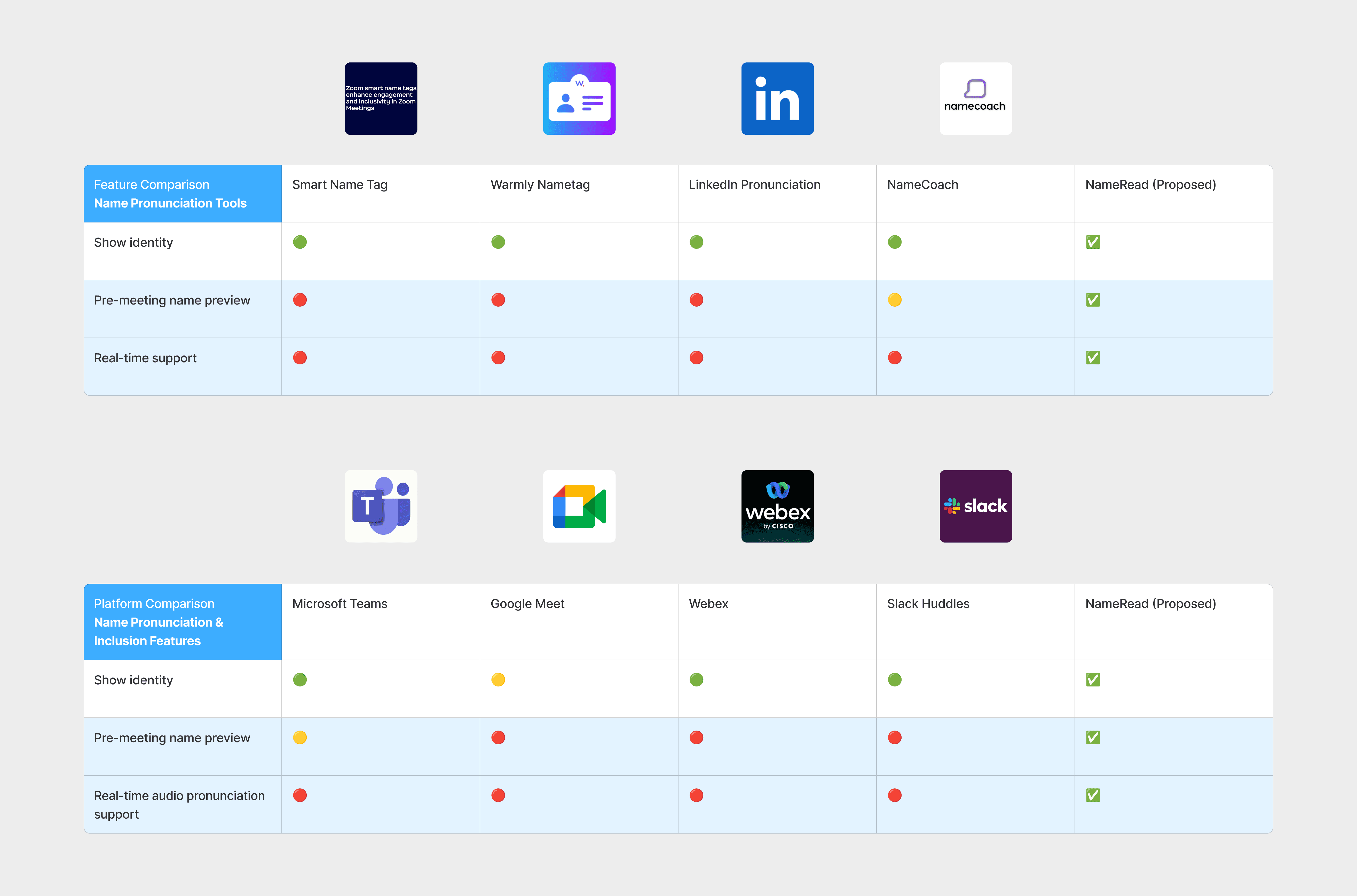
We reviewed 4 name-pronunciation tools + 4 meeting platforms and uncovered a gap. Current meeting tools support identification:
We reviewed 4 name-pronunciation tools + 4 meeting platforms and uncovered a gap. Current meeting tools support identification:
• Almost none of the tools enable private practice pre-meeting
• Almost none of the tools enable private practice pre-meeting
• None of the platforms offer one-tap in-meeting audio playback
• None of the platforms offer one-tap in-meeting audio playback
How might we help people pronounce names with confidence before speaking, without increasing social pressure?
How might we help people pronounce names with confidence before speaking, without increasing social pressure?
How might we help people pronounce names with confidence before speaking, without increasing social pressure?
Goal
Goal
Increase first-time correct pronunciation rate and perceived meeting comfort (CSAT) for first introductions through Zoom. The tool may help millions of users who are working in a global environment reduce social pressure.
Increase first-time correct pronunciation rate and perceived meeting comfort (CSAT) for first introductions through Zoom. The tool may help millions of users who are working in a global environment reduce social pressure.
• Must operate on the Zoom system 🔗: Information Architecture.
• Must operate on the Zoom system 🔗: Information Architecture.
• Must not interrupt meeting flow
• Must not interrupt meeting flow
Design Process
Design Process
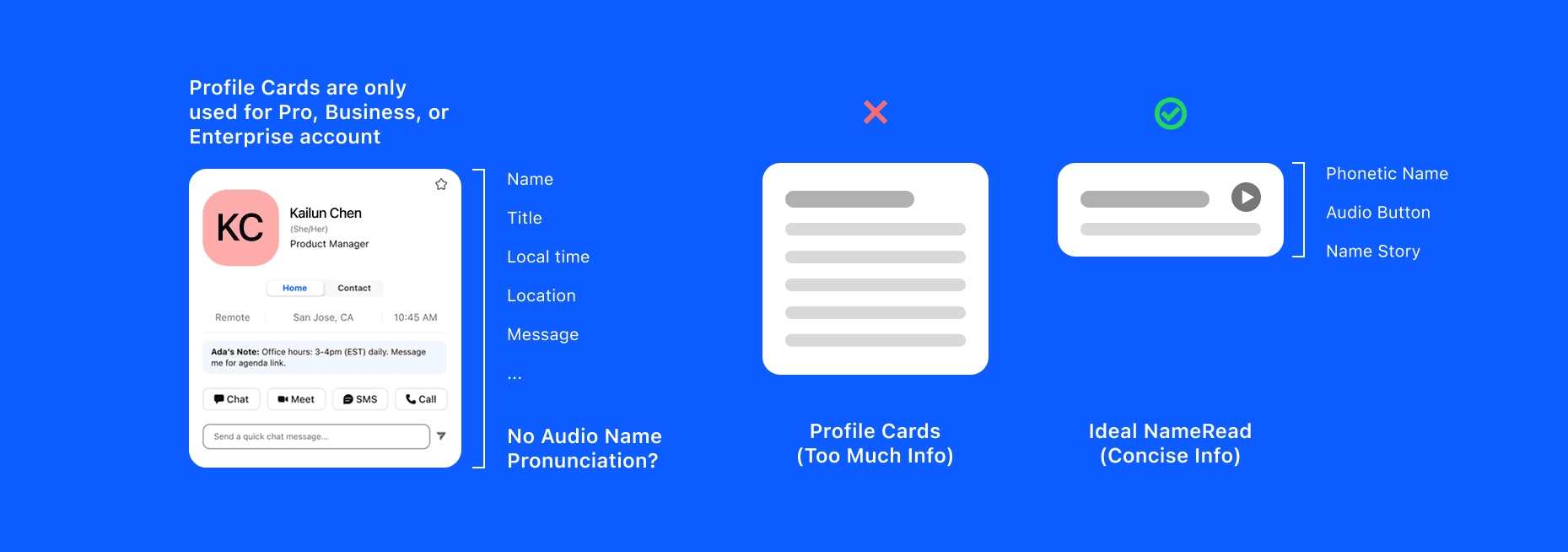
Why not rely on Zoom Profile Cards for pronunciation?
Why not rely on Zoom Profile Cards for pronunciation?
Why not rely on Zoom Profile Cards for pronunciation?
Existing solutions surface pronunciation (Profile Card), but fail to support real-time usage, are not available across all users, and are heavy to read.
Existing solutions surface pronunciation (Profile Card), but fail to support real-time usage, are not available across all users, and are heavy to read.
The pronunciation feature in Profile Cards is hidden behind multiple clicks. Besides, they support lookup, but not fast recall in real conversations.
The pronunciation feature in Profile Cards is hidden behind multiple clicks. Besides, they support lookup, but not fast recall in real conversations.
Instead of adding more information, I restructured how information is surfaced for clarity.
Instead of adding more information, I restructured how information is surfaced for clarity.
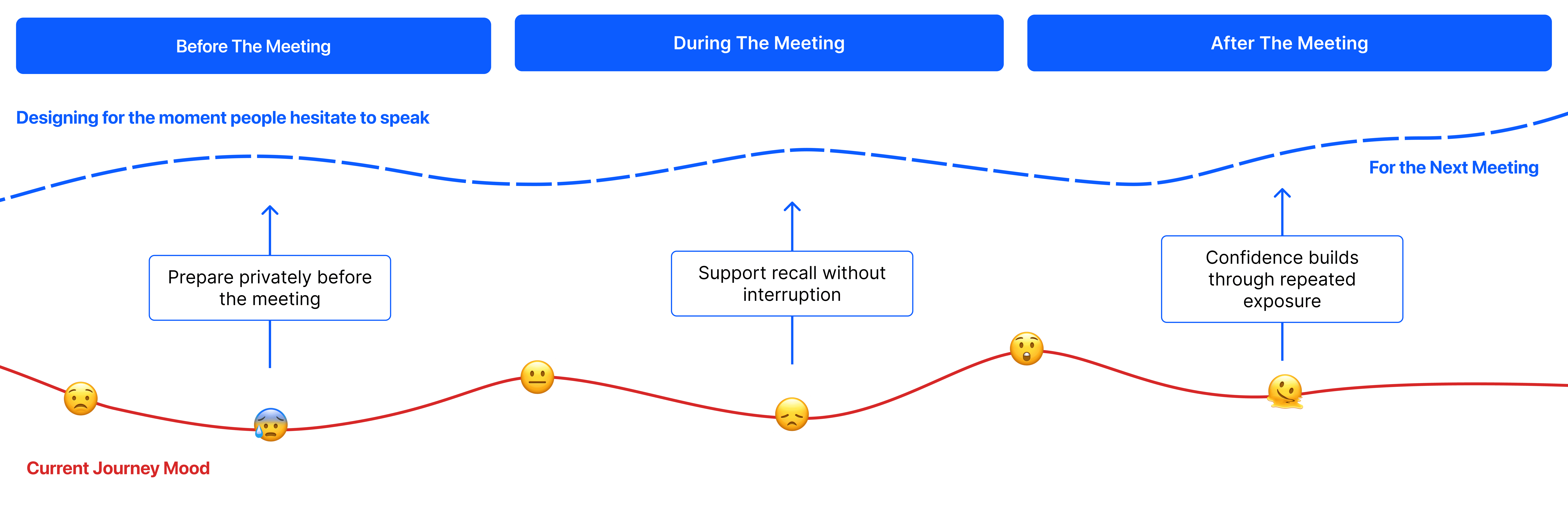
Why do I design for both before and during the meeting?
Why do I design for both before and during the meeting?
Why do I design for both before and during the meeting?
Because hesitation happens in real time, but confidence is built before the moment.
Because hesitation happens in real time, but confidence is built before the moment.
Before: users prepare privately to avoid making mistakes
Before: users prepare privately to avoid making mistakes
During: users need fast, low-friction recall while speaking
During: users need fast, low-friction recall while speaking
After: reflection happens, but behavior rarely changes in the moment
After: reflection happens, but behavior rarely changes in the moment
Introducing this lightweight NameRead Tool!
Introducing this lightweight NameRead Tool!
Introducing this lightweight NameRead Tool!
Design Solution
Design Solution
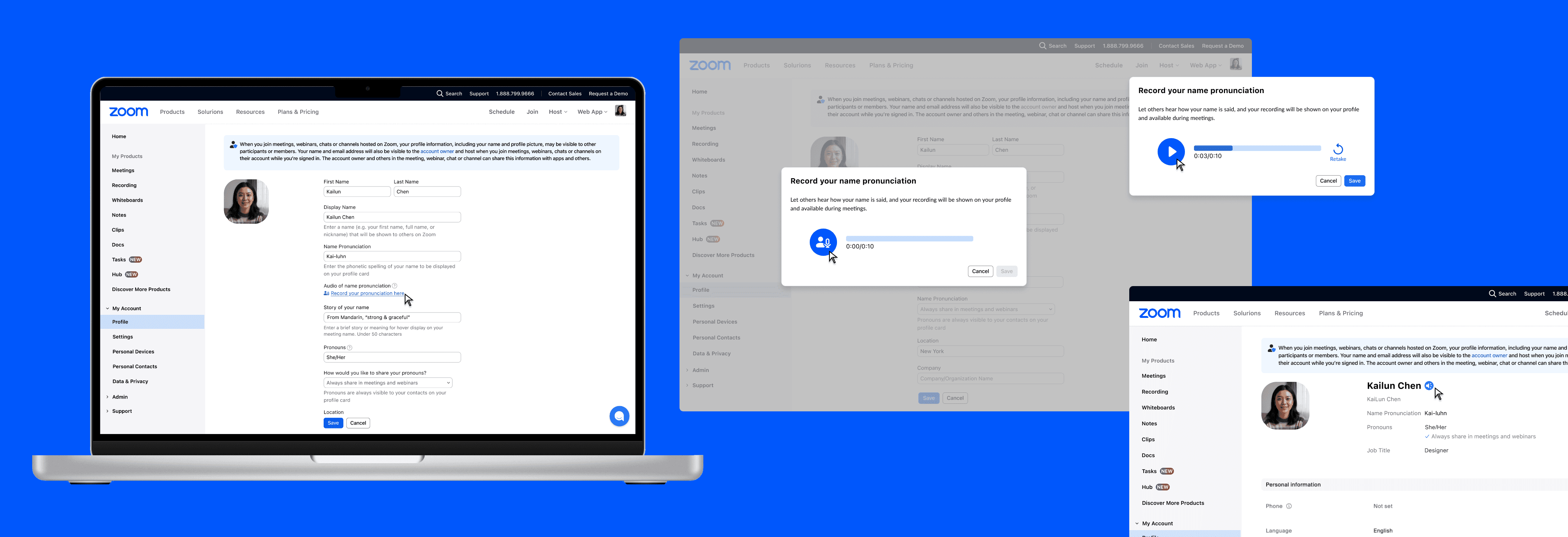
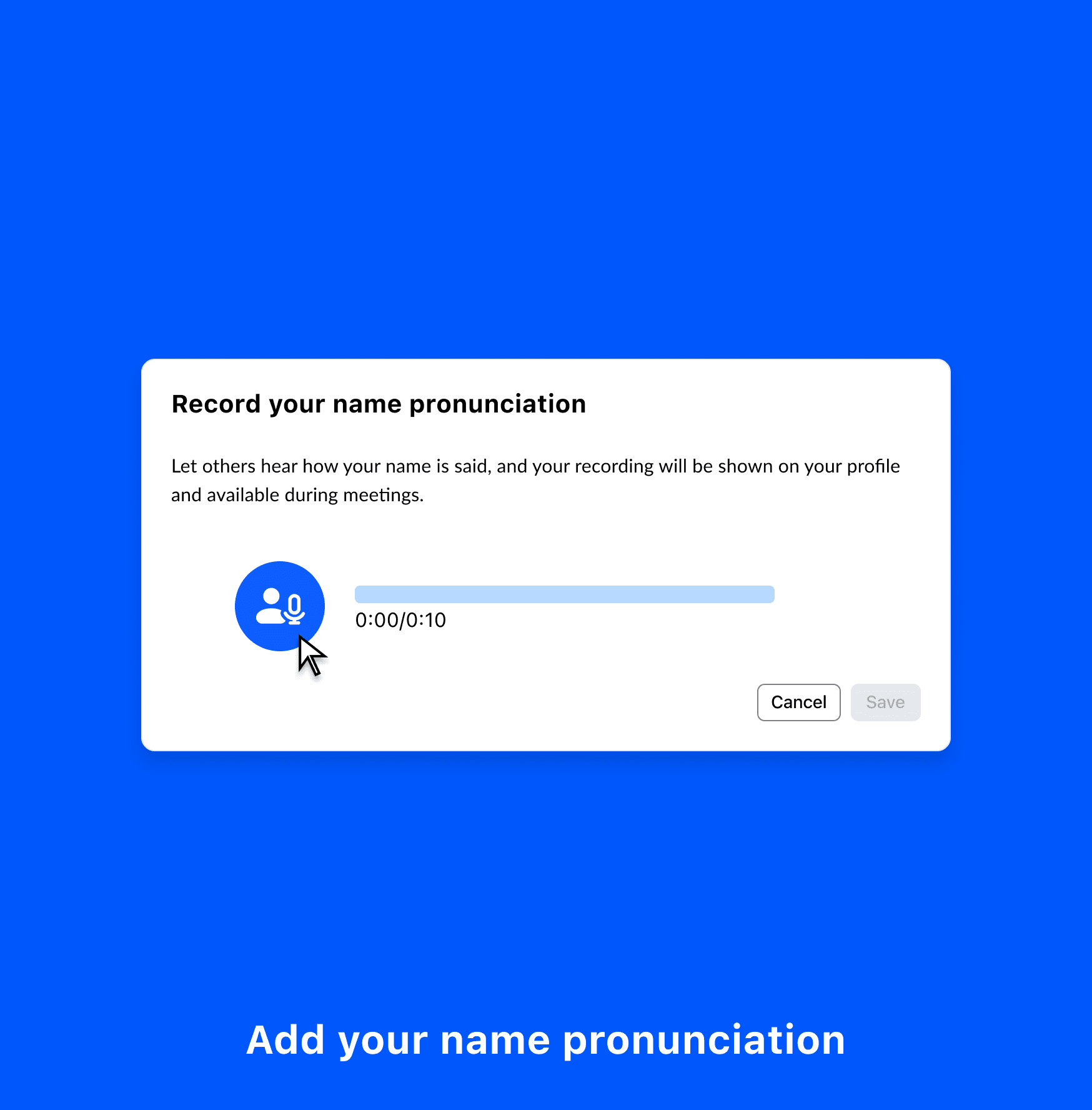
Set up your name once
Set up your name once
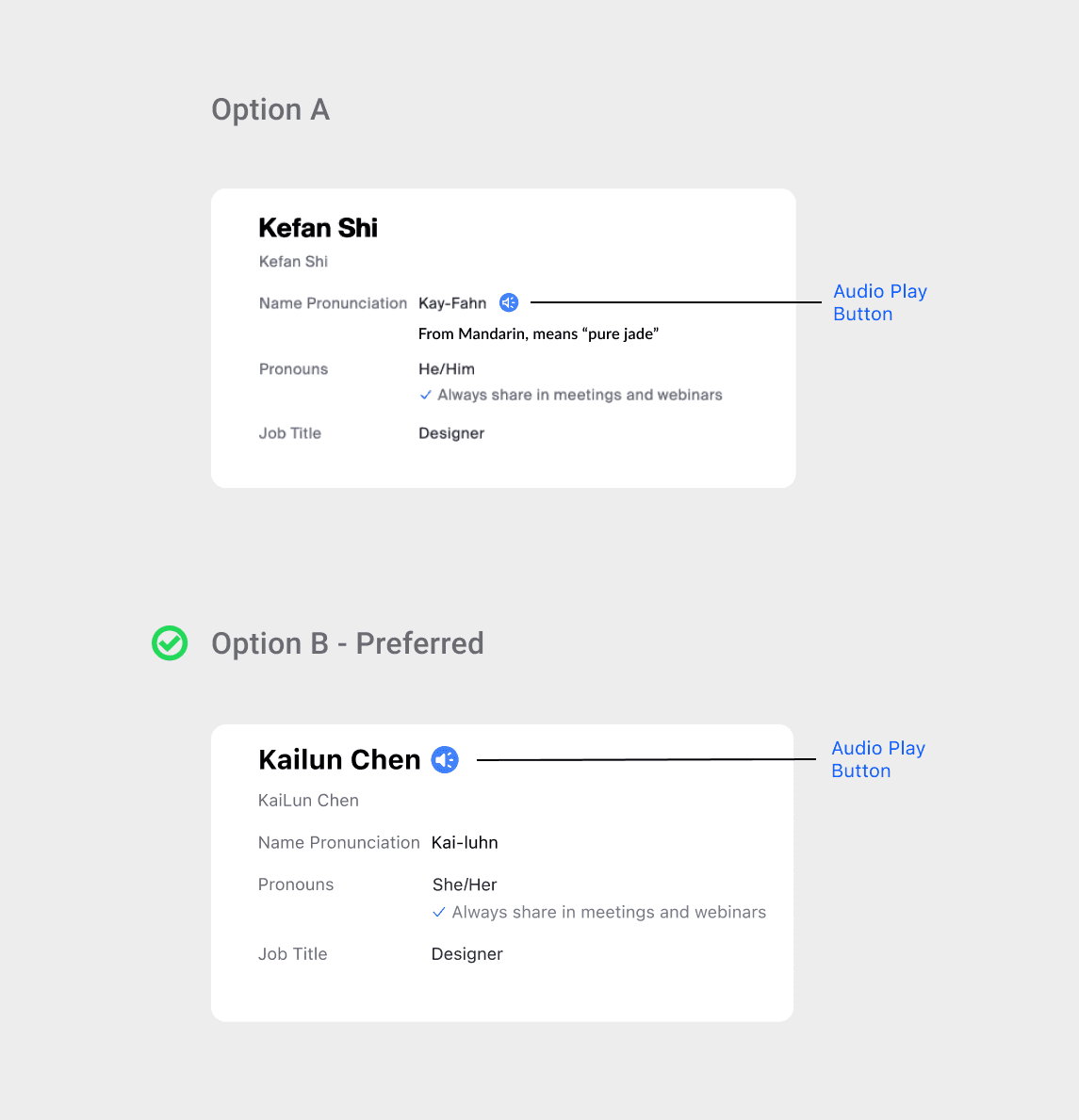
• Users can record the name in the Zoom account profile and replay their pronunciation quickly. Led an A/B test, 7/8 participants preferred a more visible button to hear the name.
• Users can record the name in the Zoom account profile and replay their pronunciation quickly. Led an A/B test, 7/8 participants preferred a more visible button to hear the name.
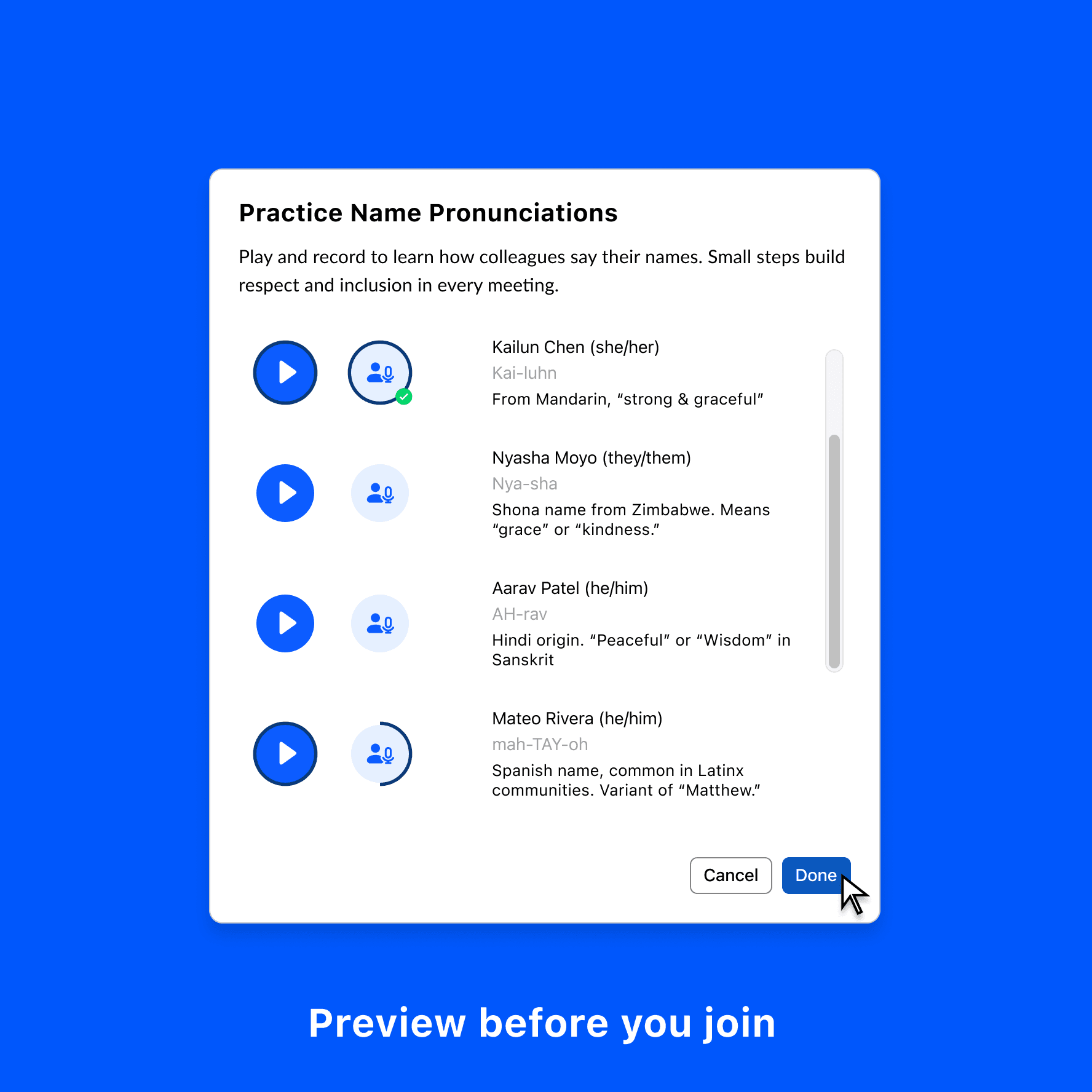
Practice before a meeting
Practice before a meeting
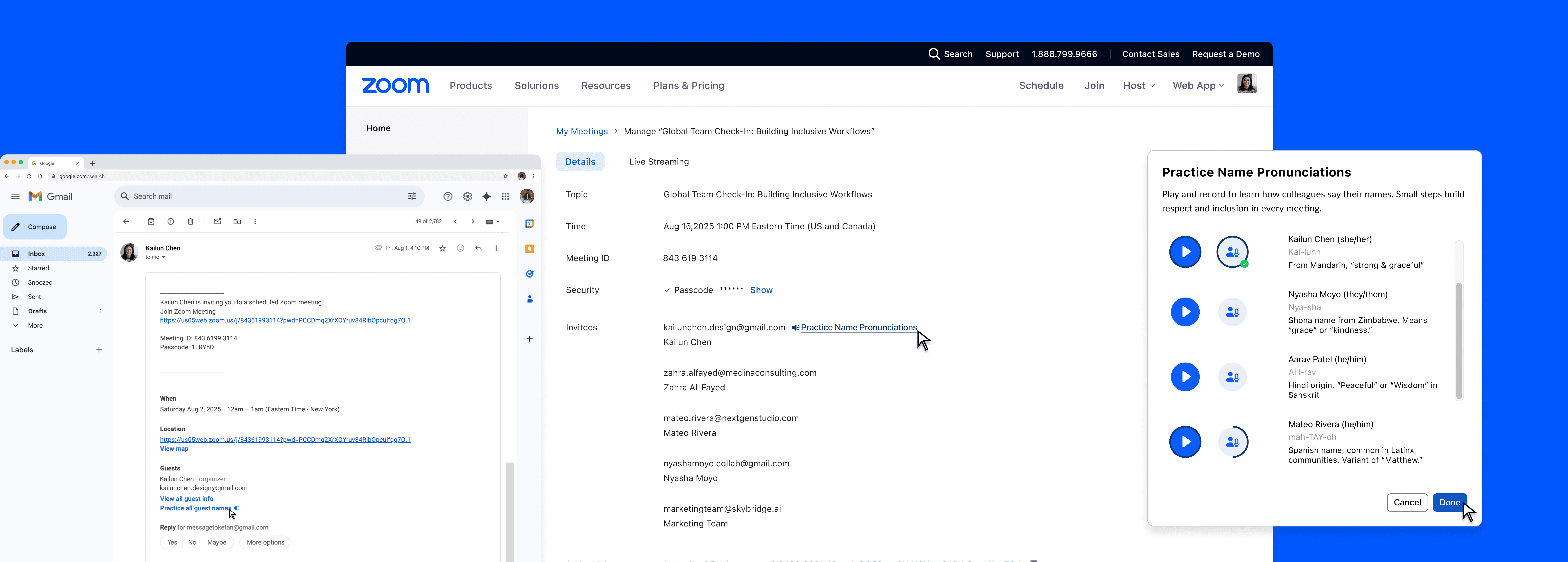
• Meeting invites include a “Name Pack” — a preview of all participants’ name pronunciation.
• Meeting invites include a “Name Pack” — a preview of all participants’ name pronunciation.
Stay confident in real-time
Stay confident in real-time
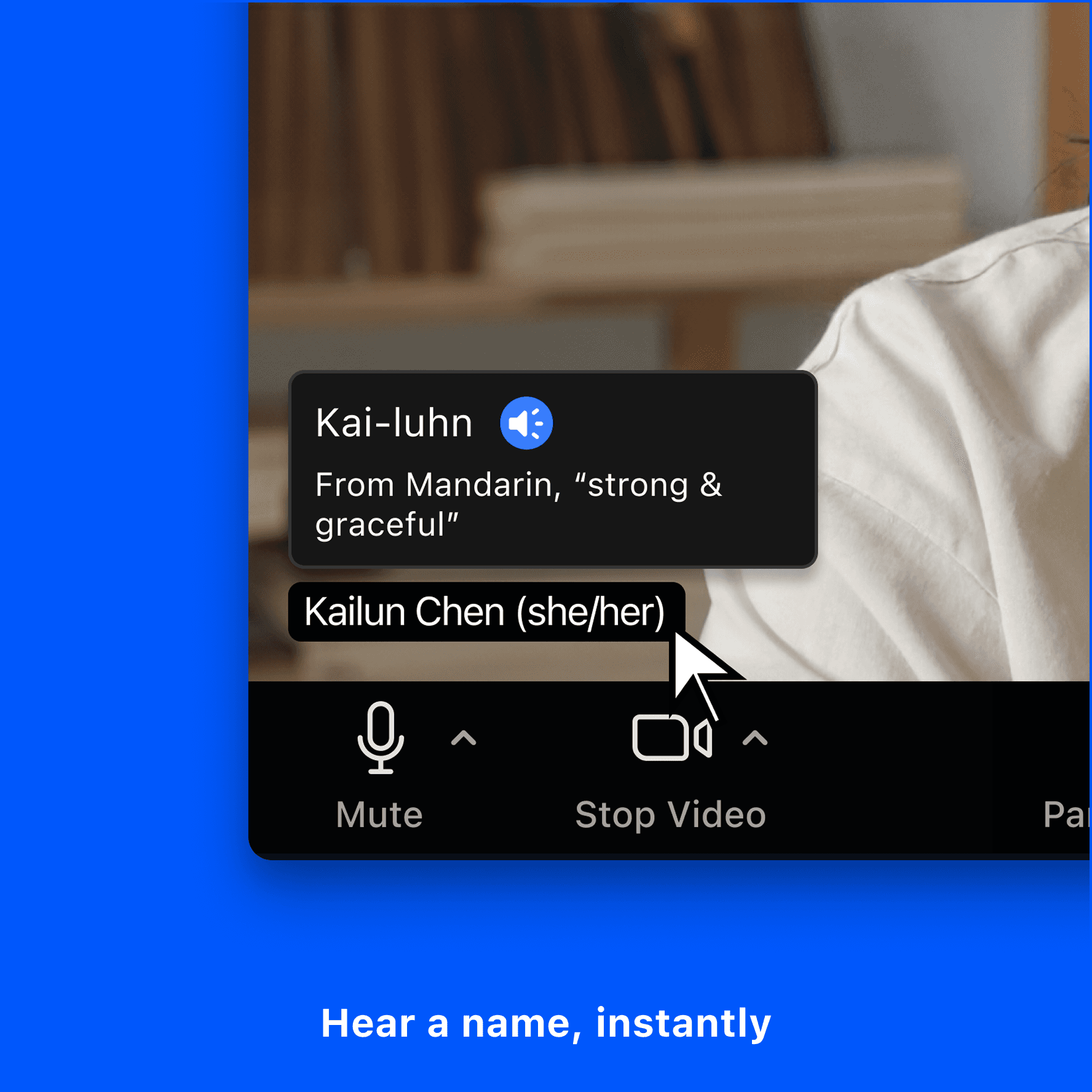
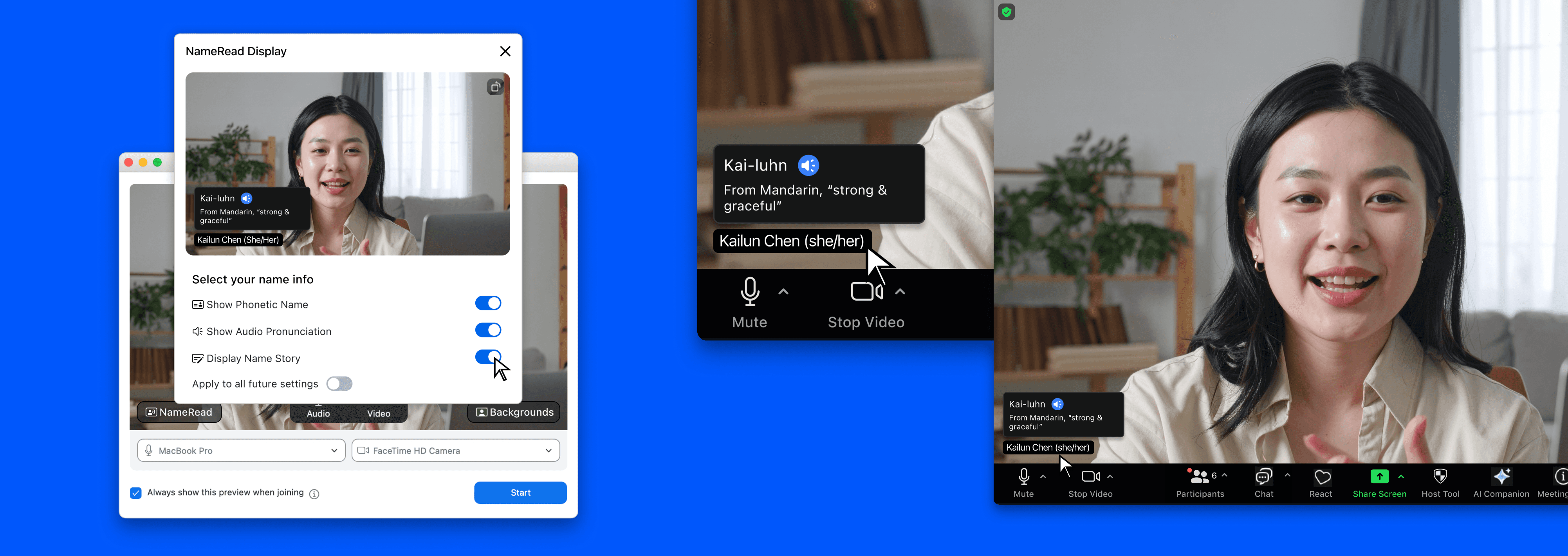
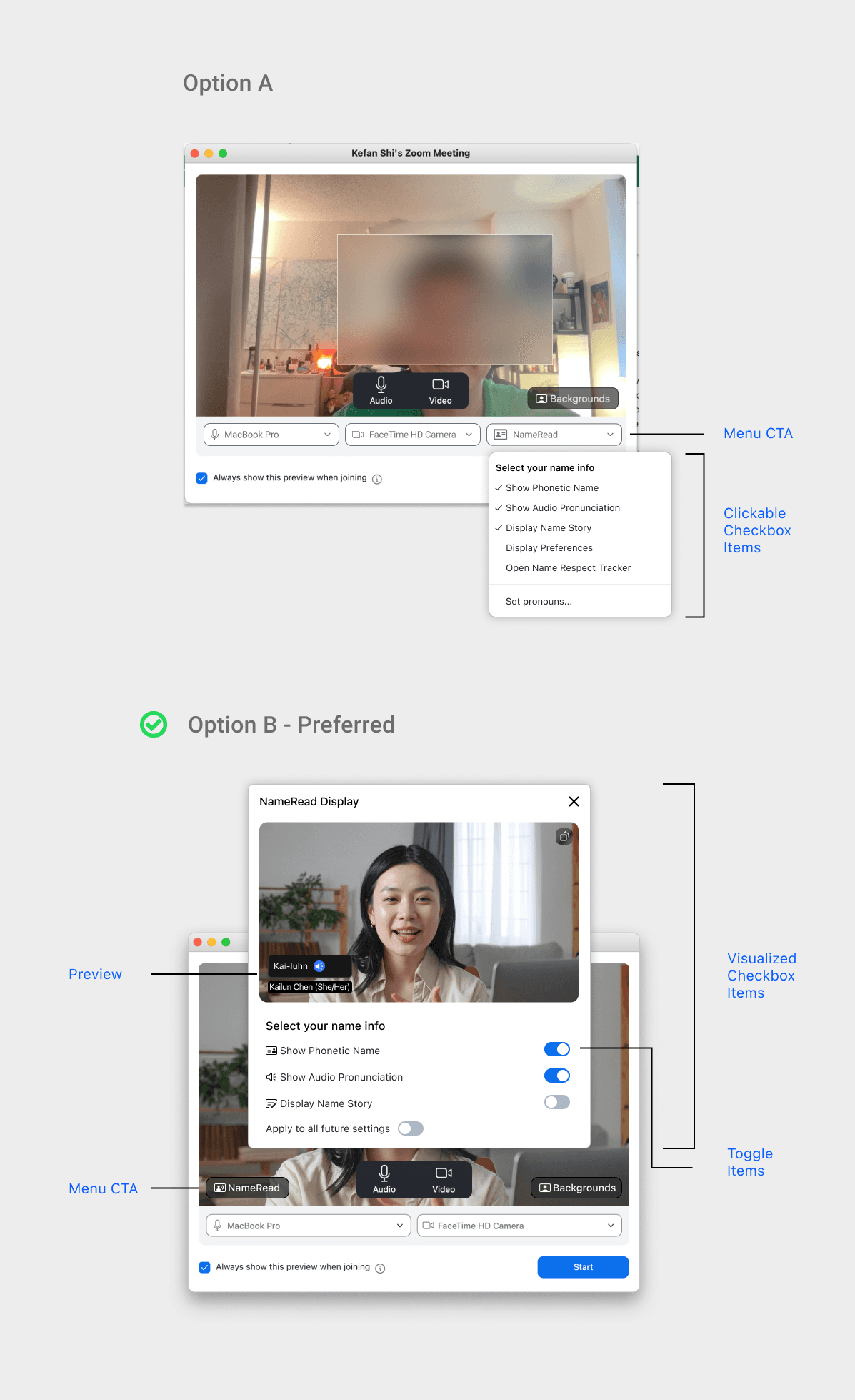
• Users can choose to display pronunciation, phonetics, and name stories visually.
• Users can choose to display pronunciation, phonetics, and name stories visually.
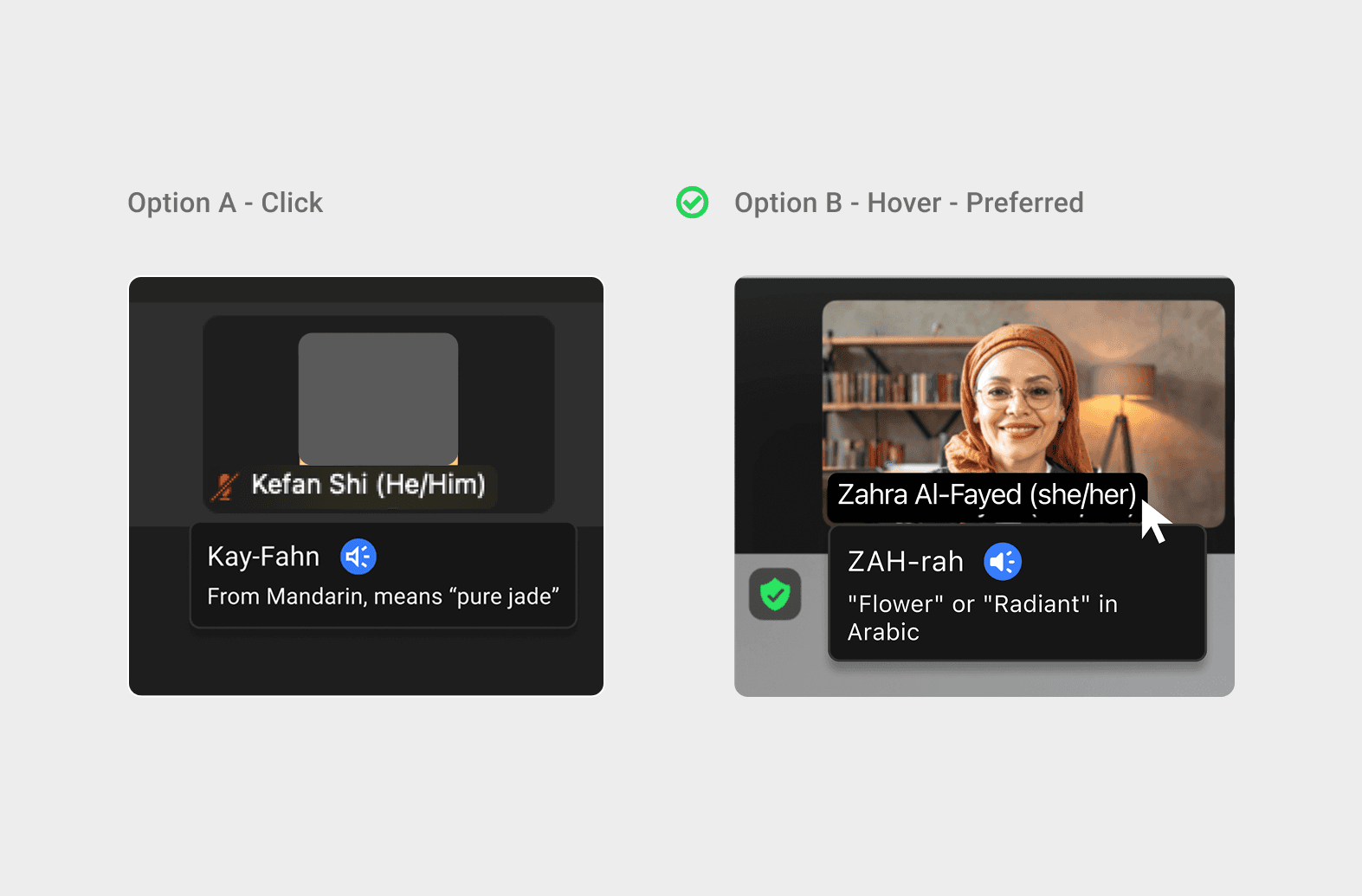
• Users can hover to see a small name tag with a playback button, phonetic line, and personal story. 8/8 participants from an A/B test preferred the Hover Card interaction over Click-to-Reveal.
• Users can hover to see a small name tag with a playback button, phonetic line, and personal story. 8/8 participants from an A/B test preferred the Hover Card interaction over Click-to-Reveal.
Highlight Interactions
Highlight Interactions
Pre-meeting Name Preview
Pre-meeting Name Preview
In-meeting Audio Name Tag
In-meeting Audio Name Tag
Outcomes
Outcomes
Tested with 16 participants in 2 rounds of usability testing, using Figma prototypes and Userberry (online tools).
Tested with 16 participants in 2 rounds of usability testing, using Figma prototypes and Userberry (online tools).
• Users felt “more respectful and comfortable.”
• Users felt “more respectful and comfortable.”
• Reduced hesitation in meetings
• Reduced hesitation in meetings
• Improved inclusivity in remote teams
• Improved inclusivity in remote teams
87.5%
87.5%
87.5%
feel less pressure
feel less pressure
7.9/10 → 8.6/10
7.9/10 → 8.6/10
7.9/10 → 8.6/10
average satisfaction
average satisfaction
100%
100%
100%
appreciate Name Preview
appreciate Name Preview
Impact
Impact
NameRead may help millions of users reduce social pressure, strengthening Zoom’s role in inclusive, cross-cultural collaboration.
NameRead may help millions of users reduce social pressure, strengthening Zoom’s role in inclusive, cross-cultural collaboration.
Next Steps
Next Steps
Designing NameRead reminded me that inclusion is built through details. The simple act of saying a name correctly can reshape how people feel seen at work.
Designing NameRead reminded me that inclusion is built through details. The simple act of saying a name correctly can reshape how people feel seen at work.
As a next step, I’d explore expanding NameRead beyond Zoom into broader workplace communication.
As a next step, I’d explore expanding NameRead beyond Zoom into broader workplace communication.

I’m Kefan! Glad we could meet here.
Why don’t we collaborate, coffee chat or learn more? So let's connect!
© Kefan Shi, 2026



I’m Kefan! Glad we could meet here.
Why don’t we collaborate, coffee chat or learn more? So let's connect!
© Kefan Shi, 2026
I’m Kefan! Glad we could meet here.
Why don’t we collaborate, coffee chat or learn more? So let's connect!
© Kefan Shi, 2026