
NameRead — never mispronounce a name again
Lightweight, private tools that help global workers say names correctly in Zoom meetings.
My Role
Product Designer
Timeline
7 Weeks, 2025 Summer
Focus
Product Design, UX Research, Visual and Digital Design

Feature Highlight
1. Name Setup with Pronunciation Input
Users can record or upload their name pronunciation, add phonetic spelling, and include a short description or name meaning.
2. Pre-meeting Name Preview
Attendees can preview and practice names before joining. Users can find each participant’s pronunciation info in the invitation email or calendar event.
3. Display Setting Before Meeting
Before joining, users can choose how their name appears in meetings, such as showing pronunciation, phonetic spelling, or cultural notes.
4. In-meeting Audio NameTag
During the meeting, users can hover over someone’s name tag to see phonetic spelling, name story, and play their recorded pronunciation.

Case Study - Process
Why It Matters
Mispronouncing names isn’t a language problem. It’s a confidence and social friction problem.
Research showed that people don’t avoid correct pronunciation, but they avoid the risk of getting it wrong in public.
83% (30/36) of participants said being mispronounced felt “awkward” or “less seen.”
75% said the biggest blocker is “I don’t want to ask again”
There are questions:
How people currently prepare for introductions?
How existing tools support (or fail to support) the process?
Research
Competitor Analysis
To understand the behaviors around name pronunciation, we reviewed 4 name-pronunciation tools + 4 meeting platforms and uncovered a gap.
Pre-meeting preparation:
Almost none of the tools enable private practice pre-meeting.
In-meeting support:
None of the platforms offer one-tap in-meeting audio playback.
Validating the insights
From 6 deep interviews and 15 surveys, we identified emotional and behavioral patterns around mispronunciation. Emotions showed the anxiety, and behaviors revealed when support is needed. Together, they shaped 4 actionable insights.
Our Goal
User Goal
Respect should never feel like a performance.
Business Goal
Increase first-time correct-pronunciation rate and perceived meeting comfort (CSAT) for first introductions.
Design Goal
Lightweight, non-intrusive interactions that fit naturally in Zoom and support inclusive communication.
Three moments: pre-meeting, first introductions, hand-offs.
How might we help people pronounce names confidently and build cultural respect in remote meetings?
Concept Direction
User Journey
We identified three moments where name pronunciation anxiety consistently peaks in remote meetings.— before, during, and after
Moment A — Before joining
Pain Point: Anxiety peaks. No safe way to practice unfamiliar name
Opportunity: Pre-meeting preview in calendar/invite for private practice.
Moment B — First introductions
Pain Point: Public anxiety about saying names wrong
Opportunity: One-tap playback next to each name.
Moment C — Hand-offs / new speakers
Pain Point: New names appear; context switches.
Opportunity: Host-led prompt (“say everyone’s name”) to reset tone.
Design Intent
Participant intent:
Learn names privately before joining, without asking or being exposed.
Host intent:
Set an inclusive tone without slowing the agenda or putting anyone on the spot.
Framing the Opportunity
To make the experience feasible and inclusive, we scoped the solution with three constraints:
1.Must not interrupt meetings
No public audio
Low-pressure, private interactions
2. Must work within Zoom’s existing layout
Information must stay close to the participant window or profile
Avoid rebuilding navigation or meeting structure
3. Must require minimal engineering
No AI pronunciation engine
No heavy profiles or additional flows
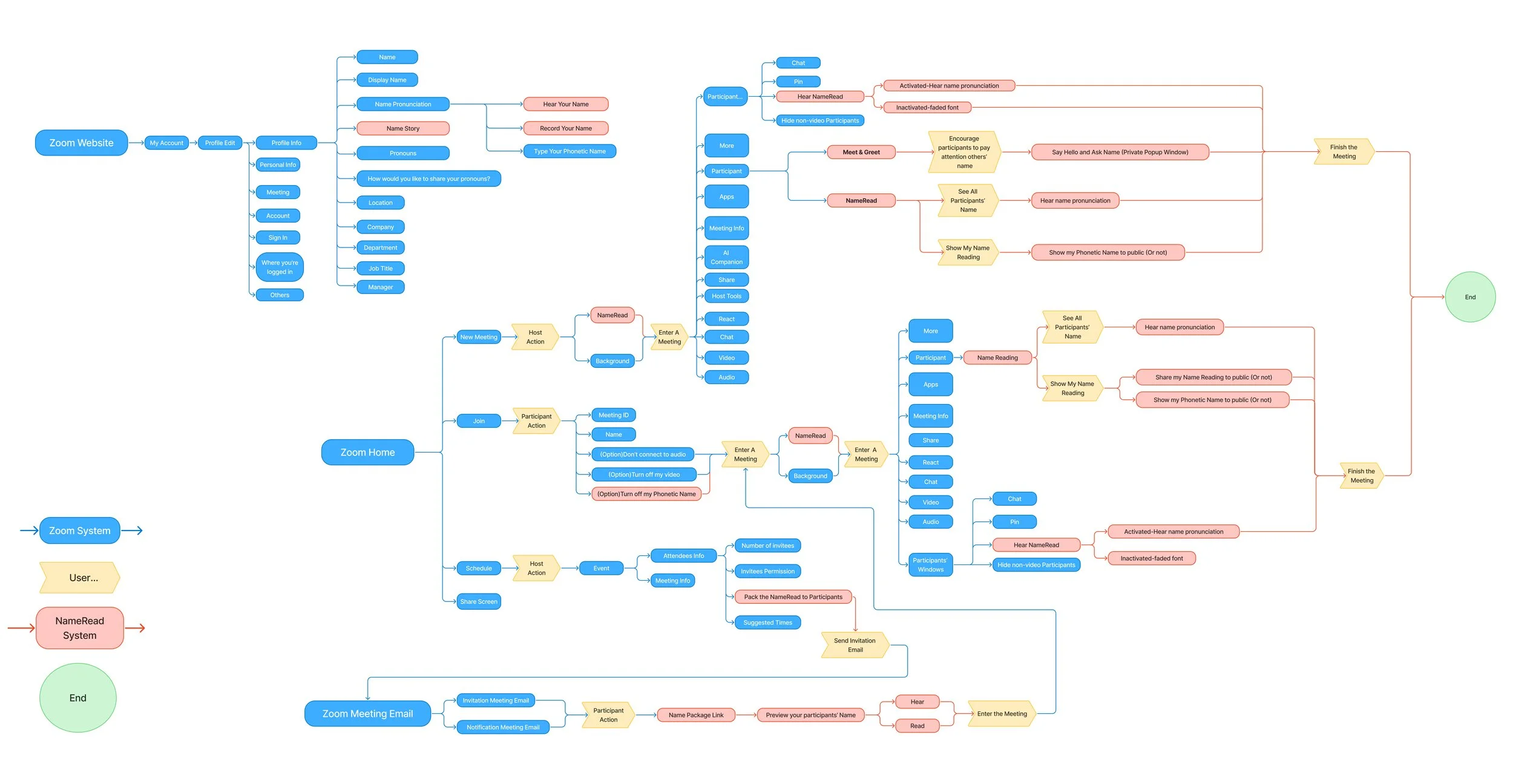
Information Architecture
As first, I built IA to visually represent a overview embedded into existing behaviors — Profile → Invite → Pre-join → In-meeting:
Name Input (Zoom Website)
Invite/Calendar (Meeting Email)
Pre-join (Display Setting)
In-meeting (NameTag and Greetings)
Why
It ensures that pronunciation support appears naturally under Zoom system.
Initial Feature Prioritization
Then, I built lo-fi prototypes to represent our ideas and gave a quick understanding of user flows and how users can navigate between different interfaces.
Tier 1- Name Foundations
1. Name Setup with Pronunciation Input
Users can type phonetic spelling or record their name in the Zoom account profile. This ensures every participant controls how their name is heard and represented.
Why: Without recorded names, no pronunciation feature can exist.
2. Pre-meeting Name Preview
Meeting invites include a “Name Pack” — a preview of all participants’ phonetics and recorded audios. It helps build confidence in a low-pressure, personal setting.
Why: This feature directly reduces the core friction that users fear of getting it wrong.
3. Display Setting Before Meeting
Before entering a meeting, users can choose whether to show pronunciation, phonetic hints, or name story. It gives users privacy and comfort before stepping into public interaction.
Why: Adoption fails without user-controlled privacy.
Tier 2- Real-time support
4. In-Meeting Audio NameTag
Users can see a small name tag with a playback button, phonetic line, and personal story. This enables accurate, respectful pronunciation during conversations.
Why: Improves accuracy but not required for core confidence-building.
5. Host-led Greetings
Hosts can turn on a “Greet” mode, encouraging participants to introduce themselves. It encourages empathy, inclusion, and genuine engagement at the start.
Why: Encourages behavior, but does not unblock the primary user need.
Tier 3- Removed Feature(Learnings from Testing)
6. Post-meeting Medal System
Initially designed as a recognition mechanism (“small moments of respect leave a big mark”). However, usability testing showed:
6/7 participants preferred removing it
“It makes me anxious if I don’t get one.”
Decision: Removed the feature to keep the experience inclusive and low-pressure.
Empathy > gamification
Why This Interaction
Tested 7 participants using Figma and Userberry lo-fi wireframes — unmoderated tests (n=3) and moderated tests (n=4).
Users found the concept “powerful and respectful,” they all love the Name Tag design and Pre-meeting function — small and private.
But 57% felt UI was cluttered and should be more user-friendly.
Average satisfaction: 7.9 / 10.
Leveraged Display Setting Before Meetings
“I’m unsure how it looks to others.”
Change: Moved Display Setting to the same layer as “Background” tools and added visual previews of NameTag styles.
Result: Task success ↑ (8/8 2nd Test)
Change: Relocated the button next to the username and simplified the layout.
Result: Led an A/B test, 6/7 participants preferred; Task time ↓ 21% ( n=8 2nd Test)
Placement: Next to The Name
Button too small and far from the name.
Change: Click was slow and hidden. Hover made pronunciation instant, lightweight, and non-interruptive.
Result: Faster, easier (8/8 2nd Test)
Click-to-Reveal → Hover Card
“I didn’t know this feature existed.”
Redesigned Pronunciation Box for Low-Pressure Interaction
The original “Correct Pronunciation Score” felt stressful
Change: Removed scoring, kept self-record, and made the info box scrollable instead of full.
Result: Respect ↑ +1 / 5 (7/8 2nd Test)
Hifi Mockups
Pre-meeting Name Preview
In-meeting Audio NameTag
Host-led Greetings
Result with 2nd Test
Pre-meeting Name Preview emerged as the strongest signal of impact.
97% overall task completion, average satisfaction 7.9/10 → 8.6/10 ⬆️
Time to locate the playback button ↓ 21%
87.5% users said the app made meetings “more respectful and comfortable”
8/8 participants preferred the low-pressure, private Pre-meeting Name Preview
Impact
NameRead reduces social pressure by shifting pronunciation learning from public performance to private preparation, strengthening Zoom’s role in inclusive, cross-cultural collaboration.
“Mispronouncing names isn’t just about language. It’s about identity, respect, and belonging.”
- Participant, Professor at Columbia University
Reflection
Designing NameRead reminded me that inclusion is built through details. The simple act of saying a name correctly can reshape how people feel seen at work. I believe NameRead can raise social awareness while helping people solve the problem.